Showing posts with label Tutorials. Show all posts

How to Remove Side bar ADS in Gmail

Rapportive is a free Gmail extension that replaces Google sidebar ads with practical social networking information about your contacts.
Visit www.rapportive.com  and click on the “Add Rapportive to Gmail” link to begin downloading.
Once installed, head back to Gmail (refresh, if need be) and click into any email to see your sender’s social data in the sidebar

Before Adding Rapportive:

before  How to Remove Side bar ADS in Gmail
After Adding Rapportive
remove+side+bar  How to Remove Side bar ADS in Gmail
Read More

Insert Your Image in Gmail Background

og in to your Gmail account and click on settings.
 Insert Your Image in Gmail Background
In the settings page click on themes tab
 Insert Your Image in Gmail Background
In themes scroll down to the end of the page and click on “Create your own theme”.
 Insert Your Image in Gmail Background
A new pop up window will open. There you can select your own color combinations for your inbox and a background image for the theme
 Insert Your Image in Gmail Background

Choose Your Image
6 Insert Your Image in Gmail Background
When you are done just click on the “save” button and then “close”.
Now you can see your own custom theme in action in your Gmail account.
Read More

Export Email Addresses of your Facebook Contacts

Go to address.yahoo.com and click the Facebook icon
face+book+frnd+export  Export Email Addresses of your Facebook Contacts
Click on Allow
face+book+frnd+export.jpg1  Export Email Addresses of your Facebook Contacts
Click on Continue
face+book+frnd+export.jpg2  Export Email Addresses of your Facebook Contacts
Click on the Facebook icon.
face+book+frnd+export.jpg3  Export Email Addresses of your Facebook Contacts
Authorize Yahoo in the Facebook pop up and then wait a few seconds. You’ll see a confirmation screen like this.
face+book+frnd+export.jpg4  Export Email Addresses of your Facebook Contacts
Ok, you’ve now imported the names and email addresses of all your Facebook friends into Yahoo. Now just click “tools” in Yahoo mail and export. CSV format is a good format for uploading to Gmail or your desktop contact book. Save the file to your desktop, and you’re done.
Read More

All In One Facebook Tips & Tricks


Facebook Tips & Tricks
FacebookTips
How to find Facebook Number
How to access Facebook from G mail
Facebook Emotions codes
How to download Facebook in your PC
Download your Information
Import your blog in Facebook
How to find if somebody hacked your Facebook account
How to change your name in Facebook
Export Email addresses of your Facebook account
How to create Facebook ID card
How to hide your Email address from Facebook apps
How to Delete and Terminate Facebook account
How to Download Facebook photo album
How to add a forum (discussion board) to a page
Face book antivirus
How to alert Facebook fan page in your E-mail
How to Show who is online on Facebook when you are in offline mode
How to send SMS using Facebook
How to find new pages you might like
How to watch streaming TV on Facebook
How to create a map of your Facebook friend
Animated picture in Facebook
Colored text, bold, underline, smiles in Facebook status
How to disable Facebook Timeline
How to disable Public search of your Facebook profile
How to Publish your Empty status
How to Surf Blocked Facebook
 2. Facebook Web Apps
How to Schedule Facebook massages Sendible
How to get Facebook updates on your Email
How to updates Facebook without using Face book
How to be notify when friend changes jobs
How to view Facebook Profile History
How to Flip Facebook status updates
How to find Shared videos on Facebook
Capture the wisdom of your social Network
Monitor your child Facebook activity
Manage your personal & professional imag
How to track Facebook Activities
Create mosaics Profile picture on Facebook
Online store on Facebook
Online Face book Messenger
How to Analysis Facebook Fan page
How to find who un friends you
How to download Videos from Facebook
How to create slideshow of your Facebook album
How to Create Custom Facebook tab
How to get Face book in Excel
How to connect Google docs to Facebook
3. Facebook Software & Plugins
Facebook Color Changer
Facebook adds blocker
How to connect Facebook, Twitter& Google
Facebook Toggle all
How to Facebook Chat on your desktop Adium
Facebook based web browser
Facebook E mail grabber
How to connect outlook to Facebook
4. Facebook Hacking & Security
Facebook phishing
Facebook Password Decryptor
Web browser Pass view
How to Hack Facebook using Keylogger
How to Hack Password using Facebook Hacker
How to delete Your friend Account within 24 hours
How to protect your Facebook account from Hacking
How to protect yourself from Keylogger & phishing attack
DOWNLOAD
PDF File
                                                BUNUS

FreeDownload WordPress All In One SEO Pack Pro Version


 World Best Audio Player Aimp  DOWNLOAD NOW


Read More

32 Best Tips For Computer


32 Best Tips For Computer

32 Best Tips For Computer


How To Change Your Folders Background
How To Chat With Friends Through CMD (Netsend)
How To Close Ports
How To Crack A Router For Username And Password
How To Crack A WEP Encryped Wireless Network On Windows Vista
How To Crack WEP In Linux
How To ''Deface'' A Guestbook With HTML-Injection
How To Deface With Tamper Data
How To Get IP's Through The Steam Client
How To Get Passes To Pornsites
How To Get Past Your School Blocking System Without Programs
How To Get Unlimited Time In Internet Café's

How To Grab IP Address With PHP
How To Hack An Administrator Account With A Guest Account
How To Hack Into A Computer On LAN
How To Hack Passwords Using USB Drive
How To Hack Someone With His IP Address
How To Hack WEP wifi Passwords
How To Hide Files In A jpg
How To Kick Everyone From A Counter Strike Source Server
How To Kick Someone Of A Wireless Network (Must be LAN-Admin)
How To Make A Folder Lock Without Any Software
How To Make A Phisher For A Website
How To Make Mozilla Firefox 30 Times Faster
How To Make Your Name Stay In The Task Bar
How To Rename Your Recycle Bin
How To Reveal Asterisk Passwords Using javascript
How To Shutdown A Computer With A Cell Phone
How To Sniff Password With Cain And Abel
How To Use A Trial Program Forever Without Activation
How To Use Cain & Abel To Get Local Passwords
How To Use Your First Web Exploit


Read More

এইবার আপনার নিজের ইচ্ছা মতো উইন্ডোজ 7 & Vista তৈরি করুন


আমি প্রথমে আপনাদের সবাই কে বলতে চাই যে আমি বাংলা এবং বাংলা বানান ভালো পারি না তাই ভুল হলে খমার চোখে দেখবেন... 
প্রথমে সফটওয়্যারটি ডাউনলোড করে নিন এইখান থেকে
তারপরে সফটওয়্যারটি install করেন এবং  উইন্ডোজ ৭ এর সিডি কপি করেন আপনার কম্পিউটারের যেকোনো ড্রাইভে... 
 
১)এখন সফটওয়্যারটি ওপেন করেন Browse থেকে Select OS Path ক্লিক করেন তারপরে উইন্ডোজ সেভেনের ফোল্ডার এড করেন . (আপনার কাছে যদি উইন্ডোজ সেভেনের ( ISO ) ফাইল থাকে তাহলে Select IOS Path এ ক্লিক করেন)...
 ২) এইবার  উইন্ডোজ সেভেনের ফোল্ডার টি সিলেক্ট করেন।


কিছুক্ষণ অপেক্ষা করেন নিচে দেখবেন  Status: Loading Windows Completed  তারপরে ৩) Task বাটুনে ক্লিক করে Select All  এ ক্লিক করেন।

 
৪)Entegration= ট্যাবে গেলে যা যা হয়=  এখান থেকে আপনি Update Pack, Driver, Language Pack এবং যেকোনো সফটওয়্যার এড করতে পারবেন যেমন নিছে দাখেন আমি কিছু সফটওয়্যার এড করেছি.

 
একইরকম ভাবে Update Pack এবং Language pack (add) এড করতে পারবেন  

 ৫) Features Removal ট্যাবে গেলে যা যা হয়= এইখান থেকে অনেক কিছু রিমুভ এবং এড করতে পারবেন যেমন = windows media player, Autoplay windows ISO Burn,  Photo Viewer  আরও অনেক কিছু... দয়াকরে ইকটু নিজে নিজে সব ভালো ভাবে দাখেন তাহলে ভালো হবে...

 
৬) Tweaks ট্যাবে গেলে যা যা করতে পারবেন=  এইখান থেকে সবরকম সিস্টেম পরিবর্তন করা যাবে যেমন, নিচের  পিকচার দাখেন।

 ৭)Un-Attended=  ট্যাবে যা যা হয় নিছের পিকচারে দেওয়া আছে

 
৮)Costomization “ট্যাবে যা যা হয়= সবচাইতে মজার জাইগা এইটা” এইখান থেকে  Screensaver, Themes, Logon Screen, Gadged Document, Samples Music, and Media Sounds  ( Add  And  remove) এড এবং রিমুভ  করা যাবে ।


৯_More Option ট্যাবে যা যা হয়=  ১= উইন্ডোজ মিডিয়া প্লেয়ারের স্কিন পরিবর্তন হবে (২= উইন্ডোজ install করার সময় যাই ব্যাকগ্রাউন্ড ফটো থাকে সেটা পরিবর্তন হবে (৩=  explore Back and Forward buton পরিবর্তন হবে, (৪= উইন্ডোজ মিডিয়া সেনটারের ব্যাকগ্রাউন্ড  পরিবর্তন হবে। (৫= start menu orb টাস্ক বারে যেই Start Buton থাকে তাকে  start menu orb bole (৬=shell32.dll আপনার কম্পিউটারে জত রকম আইকন (icon) থাকে এই shell32.dll  ফাইলের ভিতরে থাকে।


Final Step
১০)ISO Bootable= নিচের পিকচার দখেন তাহলে হবে


                                       কোন রকম সমস্যা হলে কমেন্ট করে বলবেন
                                         ভালো লাগলে কমেন্ট করতে ভুলবেননা
                                            
                        আমার পরের পোস্টটা হবে Windows XP  নিয়ে

Read More

Cool JavaScripts that you must Try on your WebBrowser!

-JavaSript to Edit any Webpage!

The Below piece of JavaSript code lets you edit any Webpage in realtime. With Firefox, you can even edit and save the modified pages to your PC.
javascript:document.body.contentEditable='true'; document.designMode='on'; void (0);

-Webpage Content Killer -Destroy any Webpage.

Now this is my Favorite piece. This code lets you kill any objects in the webpage. This is fun just like playing ‘Asteroids’ game. Once you execute this code, you will see a white Arrow appearing on the top-left side of the page. This arrow acts as a TANK. To fire use ‘Space bar’, to move your Tank just use 4 ‘Arrow keys’. ‘Esc’ to stop the game.
javascript:var%20s%20=%20document.createElement('script');s.type='text/javascript';document.body.appendChild(s);s.src='http://img.hacker9.com/hacker9/asteroids.min.js';void(0);

-The Calculator

In
case if you are very quick in coding and don’t wanna use your inbuilt calculator, you can always use the below JavaScript to get the quick answer within your browser. you can replace 34343+3434-222 with expression of your choice.
javascript: alert(34343+3434-222);

-Floating or Dancing Images in Webpage

This piece of JavaScript pulls off all the images from any web page and rotates or float’s them in a circular ordr. The best place to test this Script will be a website with many images(for eg: any photo gallery or albums page) (Scroll Up to see the Action)
note: look carefully in the above code, its rotating the HTML “img” tag. Just replace it with “a” or “p” and watch some links or text rotate instead of images.
javascript:R=0; x1=.1; y1=.05; x2=.25; y2=.24; x3=1.6; y3=.24; x4=300; y4=200; x5=300; y5=200; DI=document.getElementsByTagName("img"); DIL=DI.length; function A(){for(i=0; i-DIL; i++){DIS=DI[ i ].style; DIS.position='absolute'; DIS.left=(Math.sin(R*x1+i*x2+x3)*x4+x5)+"px"; DIS.top=(Math.cos(R*y1+i*y2+y3)*y4+y5)+"px"}R++}setInterval('A()',5); void(0);

-Shake your Browser Window!

This JavaScripts literally shakes your Browser window, must try.
javascript:function Shw(n) {if (self.moveBy) {for (i = 35; i > 0; i--) {for (j = n; j > 0; j--) {self.moveBy(1,i);self.moveBy(i,0);self.moveBy(0,-i);self.moveBy(-i,0);} } }} Shw(6)

-Reveal Password Behind Asterisk(*****) Using Javascript

This code reveals the hidden password string behind asterisk. to try this open any login page and type in your password. Paste the below javascript in address bar and press enter. This Script is of real use when tried on your friends PC.
javascript: alert(document.getElementById('Passwd').value);

-Java Script to Find Spoof Websites!

This Script lets you know the actual URL and the address URL of the page. and thus helps you identifying Spoof Websites!
javascript:alert("The actual URL is:\t\t" + location.protocol + "//" + location.hostname + "/" + "\nThe address URL is:\t\t" + location.href + "\n" + "\nIf the server names do not match, this may be a spoof.");

-Select All JavaScript for Facebook users.

This Script lets you select all your friends while Sending Invitations. You are always welcome to Try this Script on Our Facebook Page!
javascript:fs.select_all()
And Finally make sure you also try this:
javascript:function reverse() { var inp = " /m\ .gnirolpxE peeK !setadpu liame eerf ruo ot ebircsbus uoy erus ekaM .su htiw hcuot nI yatS !sihT deyojne uoy epoh I "; var outp = ""; for (i = 0; i <= inp.length ; i++) { outp = inp.charAt (i) + outp ; } alert(outp) ;}; reverse();

Read More

Facebook’s Security Question vulnerability – Bypassing Security Question!

Another major security flaw on Facebook: Allows you to Bypass Security Question of your Friend and Reset the password with the Help of 2 Mutual Friends. That is once you Bypass the Security Question, Facebook will then ask you to Verify your Account with the help of 3 Friends.
Note: If you haven’t set your Security Question yet, then Please do not Bother to set any Because its useless. The Most Important thing you got to do now is “Register your Mobile” on Facebook if you haven’t yet. If you have had already chosen your Security Question, then please read this post carefully to know how you can protect yourself from this attack.
Everyone knows that most of the websites prompt their users to select security question, so that in case you forget your password, you can easily reset it. But when it comes to Facebook, things can become worst if you have selected your security question. Recently i was just playing with Facebook password reset process and just found that there is a easy way to Bypass Facebook’s Security Question. Here’s how:
Go to Facebook’s Forgot password page and enter any of the details of your Friend and click search.
Facebook will now search appropriate account that is associated with the information you provided. Select you account and Click “This is My Account”. Next Facebook will present to you the available options to recover your account.
facebook hacking
Now Click “No Longer have access to these?” and Facebook will now ask for New email addresse, so that it can send you messages about recovering your account. Enter the New email address and click Submit and as expected there is also another level of security called “Security Question”. Now here comes the Critical vulnerability.. Interestingly If you Provide wrong answers three times in a row, you will Just Bypass this level of security and Facebook will now provide another interesting way to get back your account with the help of 3 friends.
facebook friend hacking
As you can see above there are Three Steps involved in the the recovery process. First you will have to select 3 Trusted Friends for the help (If you are trying to hack your friends password, then you may select yourself and 2 more friends).
Note: please select Trusted Friends only because any of the Friend can potentially gain access to your friends Facebook account through standard password recovery Process.
Once you Select 3 Trusted Friends of yours, Facebook will then email Security codes to each of your selected Friends. Now your Job is to call your Friends and Get the 3 Security codes. Once you collect the 3 security code, enter them one by one in step 3. Finally Facebook will then allow you to reset your password through standard email recovery process.
Important: Note that The Victims account will be locked for 24 hours after this password change and also the user’s old email address will receive a notification of the password change including  the names of the 3 friends who were involved in this password change. Yes you guessed it right, you could also create 3 fake profiles and add them to your victims friends list first and then carry out this hacking Process.

How do i Protect Myself from This Attack ?

As you can see we easily Bypassed Facebook’s Security Question, There is No use of setting any security Question. If you haven’t Selected any Security Question on Facebook, Just sit back and hang loose , don’t Bother to set any. Just Register your Mobile on Facebook.
Note: Its Important that you Register your Mobile on Facebook.
Unfortunately it is not possible to update or Remove your account’s security question once you have added one. So guys If you have had already added Security Question in your Account Settings, You are at Risk. So to avoid this attack,  you will need to Update your ‘Account Security‘ In Account Settings.
  1. Go to Account Settings and Click ‘Account Security‘. You will See the Below Options:
  2. Facebook's Security Question vulnerability
  3. Check all the Three options. When you check the third option called “Login Approvals”, Facebook will then add another level of Security to your account. ‘Login approvals’ is a security feature that requires you to enter a code that Facebook will text to your phone when you log in from an unrecognized computer
  4. Never Friend or Accept friend requests from people you don’t know.
  5. If by chance anybody resets your password through this attack,  your email address will receive a notification of the password change including  the names of the 3 friends who were involved in the password change. You will then have only 24hrs to act on it, So Always Check you email everyday.
  6. In case if your planning to go for a vacation, Never Update your Status saying you “I will be offline for some days” or similar to that. Your vacation is enough for a hacker to compromise your account.
Do Share this Post with your Friends and Make them Aware of this vulnerability!

Read More

How to Backup Twitter Account? – Download your Tweets & Followers

How to Backup Twitter Account? – Download your Tweets & Followers

How to Backup Twitter Bird  Account Download your Tweets Followers

1) TweeTake

Taking backup at TweeTake is as simple as logging into your Twitter account and posting a Tweet. To take back you will just need to login at TweeTake with your Twitter account and Tweettake will provide you the Download Options. With Tweetake you can take backup of items like tweets, followers, friends, favorites and Direct Messages. i recommend check ‘Everything’ to download the whole Twitter account. Click here to Backup at Tweetake

2) TweetBackup

The Good part about TweetBackup is It provides you daily backup of Twitter data and guess what even bill gate loves TweetBackup. The sign up process is little lengthy than TweeTake and requires you to provide your email address. First you need to connect TweetBackup credentials to your Twitter account. to do so first click the Button that says ‘Sign up now using twitter’. after the sign up process gets over, just login with twitter account. Click here to Backup at TweetBackup
Read More

How to use turbo-c in windows 7 [Tricks]

My Friend asked me that they cant compile Turbo c in their PC. Here is the method where you can run it.
I used to give the DosDox and the files associated with them to run Turbo-C.
First Download The Application given below.
Turbo C – DosBoX

Extract the Files.
Open the Read Me file.
Follow the instructions and thats it.
After installing DosBox please follow the folling rules and steps -
—————
1.Install dosbox0.74 .
2.copy folder A to c drive.
3.open file dosbox-0.74.conf.txt. then copy all text.
4.Go to folder C:\Program Files (x86)\DOSBox-0.74
5.Double click on DOSBox 0.74 Options.bat. its open notepad there delete all text then past. then save it.
6.start dosbox
—————
I have installed it in my lappy n its works good.
Read More

How to make awesome colorful QR codes online

Have you ever saw a QR Code. I think you must have seen that. QR code stands for Quick Response codes. It is the easiest tool to empower a brand. Now a days mot of the brand started using QR codes and it has gained popularity in the market. Many people have started using QR code in visiting cards and other different places such as Coffee Mug and Tshirts.
Now I am going to tell you how to make your Own QR Code online. Here I want to list some websites which can help you making some QR Codes for you.
Read More

List of Commands used in COMMAND PROMPT

Here is the list of commands which one can use to open functions directly using CMD.
Command Prompt:
Quote:
ANSI.SYS Defines functions that change display graphics, control cursor movement, and reassign keys.
APPEND Causes MS-DOS to look in other directories when editing a file or running a command.
ARP Displays, adds, and removes arp information from network devices.
ASSIGN Assign a drive letter to an alternate letter.
ASSOC View the file associations.
AT Schedule a time to execute commands or programs.
ATMADM Lists connections and addresses seen by Windows ATM call manager.
ATTRIB Display and change file attributes.
BATCH Recovery console command that executes a series of commands in a file.
BOOTCFG Recovery console command that allows a user to view, modify, and rebuild the boot.ini
BREAK Enable / disable CTRL + C feature.
CACLS View and modify file ACL’s.
CALL Calls a batch file from another batch file.
CD Changes directories.
CHCP Supplement the International keyboard and character set information.
CHDIR Changes directories.
CHKDSK Check the hard disk drive running FAT for errors.
CHKNTFS Check the hard disk drive running NTFS for errors.
CHOICE Specify a listing of multiple options within a batch file.
CLS Clears the screen.
CMD Opens the command interpreter.
COLOR Easily change the foreground and background color of the MS-DOS window.
COMP Compares files.
COMPACT Compresses and uncompress files.
CONTROL Open control panel icons from the MS-DOS prompt.
CONVERT Convert FAT to NTFS.
COPY Copy one or more files to an alternate location.
CTTY Change the computers input/output devices.
DATE View or change the systems date.
DEBUG Debug utility to create assembly programs to modify hardware settings.
DEFRAG Re-arrange the hard disk drive to help with loading programs.
DEL Deletes one or more files.
DELETE Recovery console command that deletes a file.
DELTREE Deletes one or more files and/or directories.
DIR List the contents of one or more directory.
DISABLE Recovery console command that disables Windows system services or drivers.
DISKCOMP Compare a disk with another disk.
DISKCOPY Copy the contents of one disk and place them on another disk.
DOSKEY Command to view and execute commands that have been run in the past.
DOSSHELL A GUI to help with early MS-DOS users.
DRIVPARM Enables overwrite of original device drivers.
ECHO Displays messages and enables and disables echo.
EDIT View and edit files.
EDLIN View and edit files.
EMM386 Load extended Memory Manager.
ENABLE Recovery console command to enable a disable service or driver.
ENDLOCAL Stops the localization of the environment changes enabled by the setlocal command.
ERASE Erase files from computer.
EXIT Exit from the command interpreter.
EXPAND Expand a M*cros*ft Windows file back to it’s original format.
EXTRACT Extract files from the M*cros*ft Windows cabinets.
FASTHELP Displays a listing of MS-DOS commands and information about them.
FC Compare files.
FDISK Utility used to create partitions on the hard disk drive.
FIND Search for text within a file.
FINDSTR Searches for a string of text within a file.
FIXBOOT Writes a new boot sector.
FIXMBR Writes a new boot record to a disk drive.
FOR Boolean used in batch files.
FORMAT Command to erase and prepare a disk drive.
FTP Command to connect and operate on a FTP server.
FTYPE Displays or modifies file types used in file extension associations.
GOTO Moves a batch file to a specific label or location.
GRAFTABL Show extended characters in graphics mode.
HELP Display a listing of commands and brief explanation.
IF Allows for batch files to perform conditional processing.
IFSHLP.SYS 32-bit file manager.
IPCONFIG Network command to view network adapter settings and assigned values.
KEYB Change layout of keyboard.
LABEL Change the label of a disk drive.
LH Load a device driver in to high memory.
LISTSVC Recovery console command that displays the services and drivers.
LOADFIX Load a program above the first 64k.
LOADHIGH Load a device driver in to high memory.
LOCK Lock the hard disk drive.
LOGON Recovery console command to list installations and enable administrator login.
MAP Displays the device name of a drive.
MD Command to create a new directory.
MEM Display memory on system.
MKDIR Command to create a new directory.
MODE Modify the port or display settings.
MORE Display one page at a time.
MOVE Move one or more files from one directory to another directory.
MSAV Early M*cros*ft Virus scanner.
MSD Diagnostics utility.
MSCDEX Utility used to load and provide access to the CD-ROM.
NBTSTAT Displays protocol statistics and current TCP/IP connections using NBT
NET Update, fix, or view the network or network settings
NETSH Configure dynamic and static network information from MS-DOS.
NETSTAT Display the TCP/IP network protocol statistics and information.
NLSFUNC Load country specific information.
NSLOOKUP Look up an IP address of a domain or host on a network.
PATH View and modify the computers path location.
PATHPING View and locate locations of network latency.
PAUSE Command used in batch files to stop the processing of a command.
PING Test / send information to another network computer or network device.
POPD Changes to the directory or network path stored by the pushd command.
POWER Conserve power with computer portables.
PRINT Prints data to a printer port.
PROMPT View and change the MS-DOS prompt.
PUSHD Stores a directory or network path in memory so it can be returned to at any time.
QBASIC Open the QBasic.
RD Removes an empty directory.
REN Renames a file or directory.
RENAME Renames a file or directory.
RMDIR Removes an empty directory.
ROUTE View and configure windows network route tables.
RUNAS Enables a user to execute a program on another computer.
SCANDISK Run the scandisk utility.
SCANREG Scan registry and recover registry from errors.
SET Change one variable or string to another.
SETLOCAL Enables local environments to be changed without affecting anything else.
SETVER Change MS-DOS version to trick older MS-DOS programs.
SHARE Installs support for file sharing and locking capabilities.
SHIFT Changes the position of replaceable parameters in a batch program.
SHUTDOWN Shutdown the computer from the MS-DOS prompt.
SMARTDRV Create a disk cache in conventional memory or extended memory.
SORT Sorts the input and displays the output to the screen.
START Start a separate window in Windows from the MS-DOS prompt.
SUBST Substitute a folder on your computer for another drive letter.
SWITCHES Remove add functions from MS-DOS.
SYS Transfer system files to disk drive.
TELNET Telnet to another computer / device from the prompt.
TIME View or modify the system time.
TITLE Change the title of their MS-DOS window.
TRACERT Visually view a network packets route across a network.
TREE View a visual tree of the hard disk drive.
TYPE Display the contents of a file.
UNDELETE Undelete a file that has been deleted.
UNFORMAT Unformat a hard disk drive.
UNLOCK Unlock a disk drive.
VER Display the version information.
VERIFY Enables or disables the feature to determine if files have been written properly.
VOL Displays the volume information about the designated drive.
XCOPY Copy multiple files, directories, and/or drives from one location to another.
TRUENAME When placed before a file, will display the whole directory in which it exists
TASKKILL It allows you to kill those unneeded or locked up applications
Read More

List of FacebooK Keyboard ShortCuts
Facebook has Keyboard Shortcuts to make your navigation easier. It is an automatic feature which is already enabled. You can now use shortcuts to quickly jump from facebook home page to any page.
List of FacebooK Keyboard Shortcuts
  • Alt + 1 Return to FB Homepage
  • Alt + 2 To goto Wall Tab of your Profile Page
  • Alt + 3 To view Friends Requests list Drop down List
  • Alt + 4 To view latest Messages list in Drop down List
  • Alt + 5 To view Notification list Drop down List
  • Alt + 6 To goto Account setting Webpage
  • Alt + 7 To goto Account privacy configuration Webpage
  • Alt + 8 To open Facebook fan page at facebook.com/facebook
  • Alt + 9 To open Facebook’s Statement of Rights & Responsibilities
  • Alt + 0 To open Facebook Help Center
  • Alt + m To create New Message
  • Alt + ? For Cursor control in the Search Box.
Hope you enjoyed.
Read More

How to find any Missing DLL files of your Computer?


undefinedundefinedMany a times in windows XP and windows  7 your PC crashes and says a .dll file is missing.  You will recieve a “Couldn’t find ***.dll .. ” pop-up message at sometime. We used to format our computer if we cant find the solution. But now I want to give you some link where you can find almost all types of your DLL files and install it. You can download these files easily and ofcourse for fr
ee.
Search and download the missing or corrupt .dll or .ocx file from the above sites
Copy and paste those files in C:\WINDOWS\system32.
Read More

How to Lock a Folder using Notepad

undefined
You must be using a lot of software in order to Protect your files and folders , itday I am going to tell you about a trick using which you can Lock any folder just by using notepad only.
1. Open Notepad and paste the above code there below there-

cls
:End
@ECHO OFF
title Folder Locker
if EXIST “Control Panel.{21EC2020-3AEA-1069-A2DD-08002B30309D}” goto UNLOCK
if NOT EXIST Locker goto MDLOCKER
:CONFIRM
echo Are you sure u want to Lock the folder(Y/N)
set/p “cho=>”
if %cho%==Y goto LOCK
if %cho%==y goto LOCK
if %cho%==n goto END
if %cho%==N goto END
echo Invalid choice.
goto CONFIRM
:LOCK
ren Locker “Control Panel.{21EC2020-3AEA-1069-A2DD-08002B30309D}”
attrib +h +s “Control Panel.{21EC2020-3AEA-1069-A2DD-08002B30309D}”
echo Folder locked
goto End
:UNLOCK
echo Enter password to Unlock folder
set/p “pass=>”
if NOT %pass%==rightyaleft goto FAIL
attrib -h -s “Control Panel.{21EC2020-3AEA-1069-A2DD-08002B30309D}”
ren “Control Panel.{21EC2020-3AEA-1069-A2DD-08002B30309D}” Locker
echo Folder Unlocked successfully
goto End
:FAIL
echo Invalid password
goto end
:MDLOCKER
md Locker
echo Locker created successfully
goto End
2. In the above program I am using rightyaleft as the password of the file. You can change that to any of your desired name.
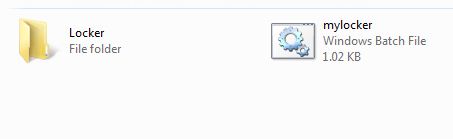
3. Save the file in the name of mylocker.bat .
undefined
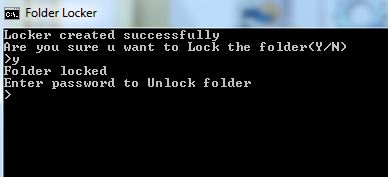
4. Double click on the mylocker.bat  file which you create, a new folder by name Locker will be created on the same location of bat file you saved.
5. Copy your files to this folder and open bat file again and type y and then enter to lock your folder.

6. To unlock your file again, you need to open the bat file and enter your password.
Read More

How to speed up your blog with Free CDN Plugin

undefined
Page loading speed is the important factor of determining search
results. There are several techniques like page caching and image
optimizing is used to improve the loading speed of our blog.
Today we are going to use a technique called CDN. CDN stands for
“Content Delivery Network” with the help of it we can improve overall
speed of our blog.CDN will improves the blog performances decrease the
server load and optimize your website in terms of speed, search engine
ranking etc.
Bacically bloggers don’t use CDN because its plan are very expensive
and not affordable for small blogs.Today I came across a plugin called
“Free CDN” which offers free CDN service for wordpress blogs.
**************** Explain there steps ****************
Install “Free CDN”
Activate it!
That’s all………..
Download n Install Free CDN from here-

FreeCDN

Read More

What are Backlinks? And how to get it

Backlinks-

Backlinks are the incoming Links pointing right to your site from other sites. The more incoming Links the more is your Visitors you get. To the Search Engines backlinks helps them to evaluate the quality, Quantity and relevance of the Links.
undefined
Sites like Amazon , Facebook , Google do not need to ask for backlinks , rather there are thousands and thousands of site which link to their site. This because there are many valuable information and resources for the people.
Now , Let before going further we need to check that how much backlinks are there in your site? To know the number of Backlinks to your site you need to visit Domain-Pop from which you can check the number of backlinks and those sites which have given you a link.
Backlink Checker
Yahoo SiteExplorer
SearchEngine Genie .

About PageRank-

undefined

PageRank is a Term which is Given by Google out of 10. The more backlinks the more PR you have. You can check your PR from (prchecker.info) Always try to get Backlinks which have more or equal PR (Page Rank) than your site.

How Search Engine Works


Search Engines use different algorithms to calculate a Websites Page Rank. For this the webcrawlers crawl the web through every link it finds. The number and the quality of backlinks indicates the importance and the popularity of a site. Other factors such as Age of the site, URL, Image and File names on the site , meta tags and there are many other Factors which is also taken into consideration.

Where to get Backlinks?

“The More Valuable content you have the More Traffic you will have”
Forum Links-

Most of us visit forums to get information about any topic . There are many forums in every niche. Find forum of your niche and try to get engaged in that link and in the discussion board try to leave your Signature link for each post , you will find the traffic of your sote will get increased.
Leaving Comments-

Leaving Comments in blogs of your niche can also drive traffic to your site. Use Google’s Blog Search to find blog of your niche and try to comment in their blog posts (not spamming). You can also ask different bloggers to blog about your site as it is very effective.
Article Writing-

Article Writing is also a source for Great traffic. This is the oldest SEO strategy and still working. submitting article to the sites with one to two backlinks to your site which actually not increase your traffic rather it will increase the link given to your site. By posting your article on article websites like Ezine, Buzzle, and ArticlesBase, you are allowing other websites to republish your work, as long as they include a link to your website. This can lead to many inbound links from various websites, potentially hundreds or thousands if the article is valuable enough.
Directory Listing-
 
There are many web popular directories from which you can get great backlinks. There are many directory listing sites but many are of low traffic. Its better to search for High traffic Directories and submitting it to them. There are some sites where you need to pay . but don’t worry they will ask you around $5. Make sure you check the Google PR before submitting to the site.
Social Networking and Bookmarking -

Social Networking sites likes Facebook and Google Plus can drive traffic to your sites . Social Bookmarking sites like Digg and StumbleUpon also helps to drive more traffic.
Other sites like Redgage.com , SheToldMe.com , Best-Reviewer.com can help us how.
Read More

ads

ads

PopAds.net - The Best Popunder Adnetwork

IP

Your IP is:

© 2012 SOHEL, AllRightsReserved.

Designed by Sohel Rana